
A customizable floating dock that brings your favorite tools within reach in Clip Studio Paint. ✨
Download for Windows
🆕 v1.3.0
Windows 10/11
64-bit
✨ Free

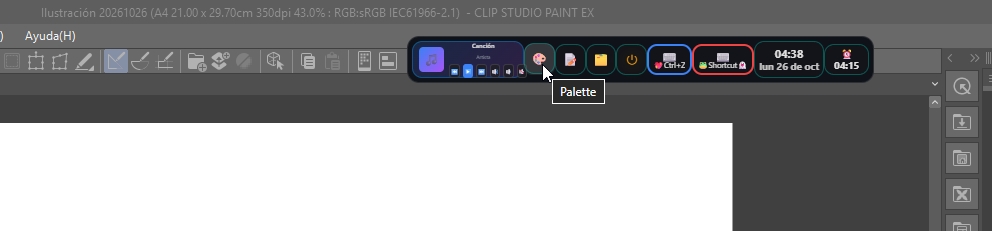
Your dock, always on top of everything — now with Access, Palette and Notes.
🚀 Release
Three new tools for your creative flow
v1.3.0
Meet Access, the color palette and floating notes: three new tools for your everyday workflow. Plus the guardian that keeps everything on top. Try the mini demos below — they really work. 🗂️🎨📝
🗂️ Access
🎨 Color Palette
💧 Infinite eyedropper
📝 Notes & PostClip
🛡️ Always on top
💬 Feedback button
✨ No more flicker
New in 1.3.0
Access: your shortcuts, always within reach NEW
A new drawer that lives in your dock. Add folders, images, files and URLs, and open them without leaving your workflow.
- Add folders, images, files and URLs — everything you need for the project you are working on.
- Organize your shortcuts in tabs and keep each collection one click away.
- Open anything straight from the dock while you work in Clip Studio Paint.
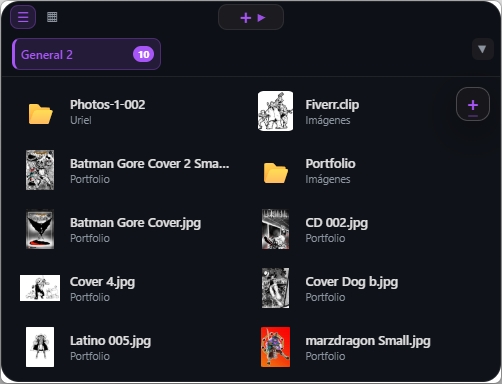
New feature
Color Palette & Infinite Eyedropper NEW
Organize your reference colors and catch them with an eyedropper that never stops.
- Reference folders: sort your colors by project so the palette you need is always at hand.
- Take the Collector to any monitor — a floating window you can park right next to your references.
- Infinite eyedropper: it stays on after every capture. Keep picking colors without reopening it once.
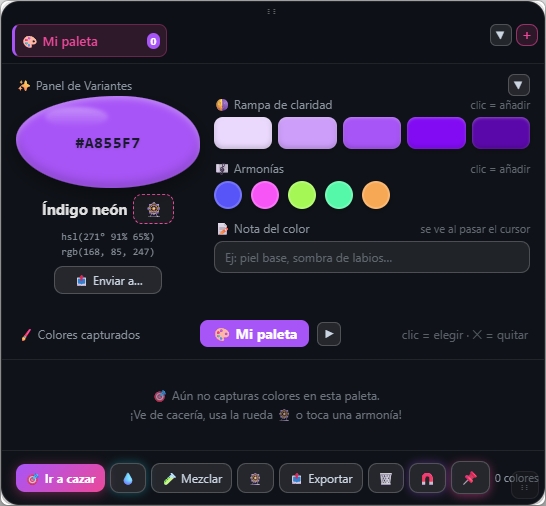
Tip: bind the Collector to your drawing app’s “Get color from screen” shortcut — PinClip stores every color.
New feature
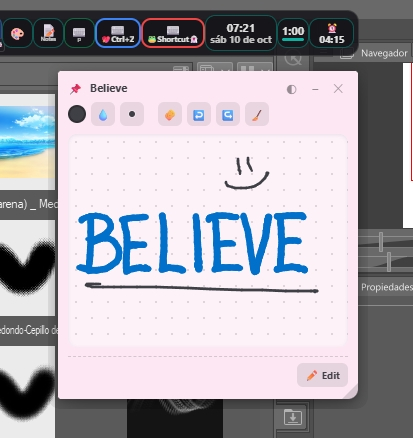
Notes & PostClip floating stickies NEW
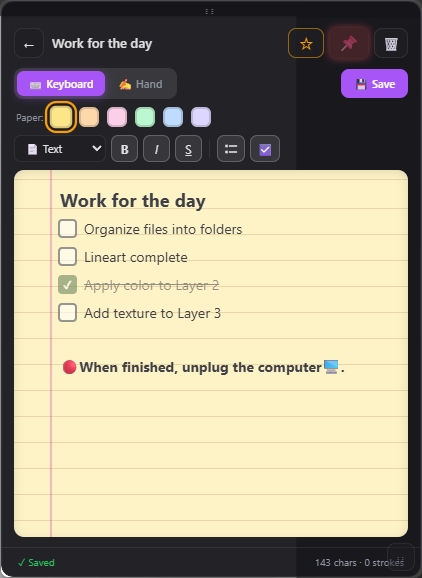
Write it down before it escapes your head, then pin it right on top of your canvas.
- A new Notes block where you type with the keyboard or write by hand with your stylus.
- Drop your notes anywhere with the new PostClips: tiny floating windows that stay on top of everything, just like a PostIt on your screen.
- Six paper colors, bold / italic / underline, checklists and a live counter of characters and strokes.
- Favorite with the star, pin it to the front, delete it or edit it — and everything is saved automatically.
Fixed forever
On top of everything, for good. NEW
PinClip now stays above your windows. Always. No more hiding behind your work.
- The dock is now always visible on top of every window you have open.
- A new guardian keeps the dock up there and pulls it back the moment Windows buries it at the bottom of the screen.
- That used to be one of our worst bugs. Say goodbye to it. 👋
🛡️
▶🔊🎨📝⌨️🕐🎯
🪟 A maximized window
✕ Windows pushed the dock down
🪟 A maximized window
▶🔊🎨📝⌨️🕐🎯
🛡️ The guardian pulled it back on top
Small changes
Small changes, big difference
Feedback button
Send us your feedback, comments, suggestions or even a hello, straight from the configurator. It sits right on top of the Exit button.
Exit PinClip, finally visible
The exit button moved to the bottom-left corner of the main configurator. It used to be buried inside one of its sections.
System is now Utilities
The System category has a new name: Utilities. Same clock, timer and alarm — just easier to find.
Bug fixes:
no more flickering when sending a command to the app you are using, plus a bunch of other corrections and stability improvements across PinClip.
Now with Access, Palette and Notes buttons, right next to your shortcuts
What makes PinClip special?
NEW
Access Drawer
Keep folders, images, files and URLs one click away. Your whole project, organized in a drawer that lives in the dock.
NEW
Color Palette
Hunt colors anywhere on your screen with an eyedropper that never turns off. Lightness ramps, harmonies, notes, mixing and export built in.
NEW
Notes & PostClips
Type or handwrite your notes, then drop them anywhere on screen as tiny sticky windows that always stay on top.
Media Controls
Play, pause, skip tracks and adjust volume without minimizing Clip Studio. Your music, always at hand.
Smart Shortcuts
Record simple keys or complex combinations. Automate your most used tools with one click.
Always on Top
A guardian keeps your dock above every window. Windows used to bury it at the bottom of the screen — never again.
Clock, Timer & Alarm
Live clock, clock with date, countdown timer and daily alarm. All inside the Utilities category, always at pen’s reach.
Custom Companions
Import your own GIF, PNG or WebM character and choose its BASE pose. The rest of the animations play at random.
Your Style, Your Rules
Customize size, opacity, theme, button order and more. A dock that adapts to you, not the other way around.
Floating & Limitless
Drag it to any corner of your screen. Always visible, never getting in the way of your creativity.
Meet Clipy
Your animated companion on the desktop. Now with its own category: activate Clipy, flip it, resize it and more.
Portable Setup
Export your configuration to a .pinclip file and take it to any PC. Your workflow, anywhere.
Explore the Interface
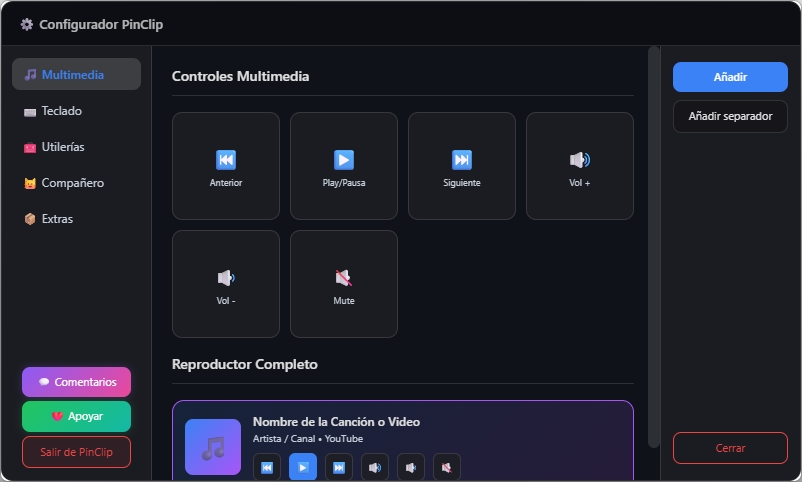
The configurator now shows the new Utilities category, plus the Feedback and Exit buttons sitting proudly at the bottom-left.
⚙️ Full Configuration Panel
Feedback and Exit PinClip are now at the bottom-left, easy to reach.
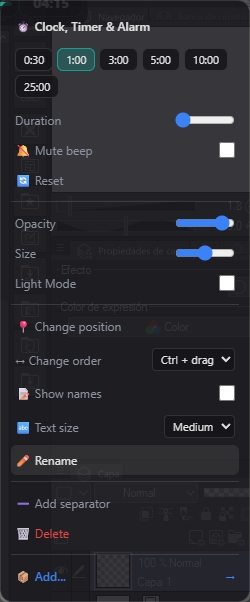
📋 Quick Context Menu
Every button keeps its own quick options menu.
💡 Share Your Ideas
Help us improve PinClip with your feedback and suggestions
💛 Support the project
PinClip is free and always will be. Your support only decides how fast things arrive: it funds the tools behind the project and turns the next ⏻ button into reality.
Implementation goal: ⏻ shutdown button
$0 / $20 USD · 0%
⏻ Windows shutdown
Coming soon
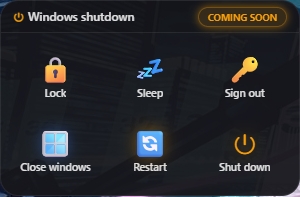
👀 Frontend preview — not functional yet
Shut down, restart, lock or sign out of your PC with one click from the dock — without leaving Clip Studio Paint.
🚀 It will be developed once the goal is reached.
Will PinClip stay free?
Yes. Every feature is and will remain free — support only speeds up what comes next.
What happens if the goal isn’t reached?
The support still goes to keeping the project alive and to the next goal.
Does the affiliate link count toward the bar?
No. The bar only counts confirmed direct PayPal donations.
How is the bar updated?
Manually — every time a donation arrives, the amount and the date are updated.
Ready to transform your creative workflow? 🚀
PinClip is 100% free, safe and installs in seconds.
Download PinClip Now